
Hardware Wallet Security Checklist: The Complete Setup and Verification Guide

The Self-Custody Paradox and the Need for Rigorous Protocols
The core promise of decentralized digital assets is complete, sovereign ownership. By removing financial intermediaries, individuals assume direct control over their capital. However, this transfer of authority introduces a profound operational challenge: the individual becomes solely responsible for their own security architecture. While hardware wallets are widely recognized as the gold standard for securing private keys, simply owning a device does not guarantee safety. Human error, physical vulnerabilities, and sophisticated social engineering remain active vectors of compromise.
A hardware wallet is not an impenetrable shield; it is a highly specialized cryptographic tool. Its efficacy depends entirely on the operational protocols established by the user. Without a systematic methodology for unboxing, initializing, configuring, and utilizing these devices, users often inadvertently expose their private keys to remote or physical theft. This comprehensive hardware wallet security checklist provides a highly detailed, step-by-step framework to ensure your hardware wallet remains an uncompromised vault for your digital assets.
This guide is designed for long-term digital asset holders, treasury managers, and security-conscious individuals who require a rigorous, non-custodial framework. It is not intended for high-frequency traders who prioritize execution speed over maximum security, nor is it a buying guide for specific brands. Instead, this is a procedural manual focused on eliminating single points of failure across the entire lifecycle of hardware wallet ownership.
Threat Modeling: What Hardware Wallets Protect Against (and What They Don’t)
To effectively secure any cryptographic asset, one must first understand the specific threat vectors a hardware wallet is designed to mitigate. A hardware wallet operates on the principle of cold storage: it isolates the private keys—which are used to generate public addresses and sign transactions—from internet-connected environments. This isolation prevents remote attackers from extracting keys via software vulnerabilities, malware, keyloggers, or active browser session hijacking.
However, the protective boundary of a hardware wallet is limited. It cannot prevent a user from signing a malicious smart contract transaction, nor can it protect funds if the user voluntarily enters their recovery mnemonic into a phishing website. Furthermore, physical access to the device introduces distinct hardware attack vectors. Understanding these boundaries is critical to establishing a comprehensive security posture.
Remote Software Attacks vs. Physical Extraction
Remote software attacks represent the vast majority of cryptocurrency thefts. In these scenarios, malware on a host computer monitors clipboard activity to swap recipient addresses, or keyloggers record keystrokes during wallet setup. Hardware wallets mitigate these vectors by performing all cryptographic signing operations on an isolated microcontroller. The private key never leaves the physical device; only the signed transaction payload is transmitted back to the host machine.
Physical attacks, by contrast, require an adversary to have direct custody of the hardware wallet. Depending on the architecture of the device, sophisticated attackers may attempt side-channel attacks, such as Differential Power Analysis (DPA) or electromagnetic analysis, to observe physical properties of the chip during cryptographic operations and reconstruct the private key. To defend against physical extraction, high-quality hardware wallets utilize specialized chips known as Secure Elements (SE) rather than standard, general-purpose microcontrollers.
The Role of Secure Elements (SE) vs. Microcontrollers (MCU)
The distinction between a Secure Element and a general-purpose microcontroller is a foundational concept in hardware security. Standard microcontrollers, such as the STM32 series widely used in open-source electronic devices, are highly versatile but lack robust physical hardening. If an attacker gains physical possession of a device relying solely on a standard MCU, they can potentially perform voltage glitching attacks to bypass memory readout protections and extract the private key directly from flash memory.
A Secure Element (such as those certified under Common Criteria EAL5+ or EAL6+) is a tamper-resistant chip specifically designed to store cryptographic keys and run secure applications. These chips feature physical shielding, active environmental monitoring (to detect changes in temperature, voltage, or clock frequency), and cryptographic hardware accelerators that execute operations in constant time, neutralizing side-channel analysis. Implementing a secure hardware wallet security checklist requires understanding whether your specific device utilizes a Secure Element to safeguard its cryptographic core.
Key Takeaways
- Hardware wallets isolate private keys from online environments, neutralizing remote software threats like keyloggers and clipboard malware.
- A Secure Element (SE) chip provides critical physical defense against side-channel attacks and physical key extraction, whereas standard microcontrollers are vulnerable to physical tampering.
- No hardware device can protect against user-authorized transactions, such as signing malicious smart contracts or disclosing seed phrases to external parties.
Phase 1: Procurement and Unboxing Verification
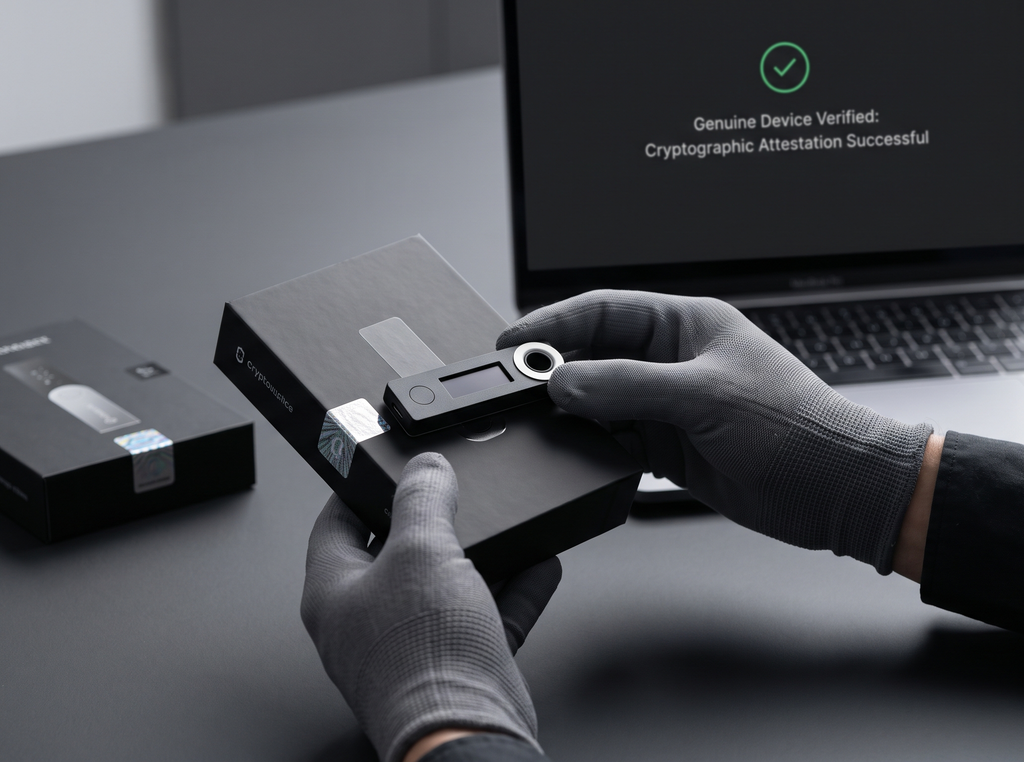
The security of a hardware wallet begins long before it is powered on. Supply chain attacks—where a device is intercepted, modified, or pre-configured during transit—are highly targeted and exceptionally difficult to detect post-setup. A compromised device can look and function identically to an authentic one, while silently broadcasting private keys or utilizing a pre-set seed phrase controlled by an attacker.
Strict procurement protocols are the first line of defense in our hardware wallet security checklist. Verifying the physical and cryptographic integrity of the device upon arrival ensures that the trust chain established by the manufacturer remains unbroken.
Authorized Channels and the Danger of Resellers
Under no circumstances should a hardware wallet be purchased from unauthorized third-party marketplaces, auction sites, or unverified physical retailers. Attackers have been documented purchasing legitimate hardware wallets, carefully opening the packaging, flashing malicious firmware or pre-generating a seed phrase with an accompanying “scratch-off” card, repackaging the device to look factory-sealed, and returning it or reselling it to unsuspecting buyers.
Always purchase directly from the manufacturer’s official website or from a certified distributor explicitly listed on the manufacturer’s directory. Additionally, opt for shipping methods that offer comprehensive tracking and require a signature upon delivery, reducing the window of opportunity for interdiction during transit.
Physical Inspection and Cryptographic Attestation
Upon receiving the package, perform a meticulous physical examination. While shrink-wrap and holographic seals are easily replicated by motivated adversaries, check for obvious signs of tampering: physical damage to the box, misaligned seams on the device casing, or unexpected contents inside the packaging (such as printed instructions instructing you to use a pre-generated recovery phrase). However, physical inspection alone is insufficient.
Modern hardware wallet manufacturers utilize cryptographic attestation to verify device authenticity. When you connect a genuine device to the official companion application for the first time, a cryptographic handshake occurs. The companion app sends a challenge to the device, which must sign the challenge using a private key embedded in its Secure Element during production. If the signature is verified against the manufacturer’s public root certificate, the device is confirmed authentic. If this attestation check fails or is bypassed, the device must be decommissioned immediately.
Bottom Line
- Only purchase hardware wallets directly from verified manufacturers or certified distributors to prevent supply chain tampering.
- Do not rely solely on physical packaging seals; cryptographic attestation via the official companion app is the only definitive way to verify device authenticity.
- Immediately reject any device that arrives with a pre-configured seed phrase or printed recovery cards containing pre-filled words.
Phase 2: Initialization and Seed Phrase Generation
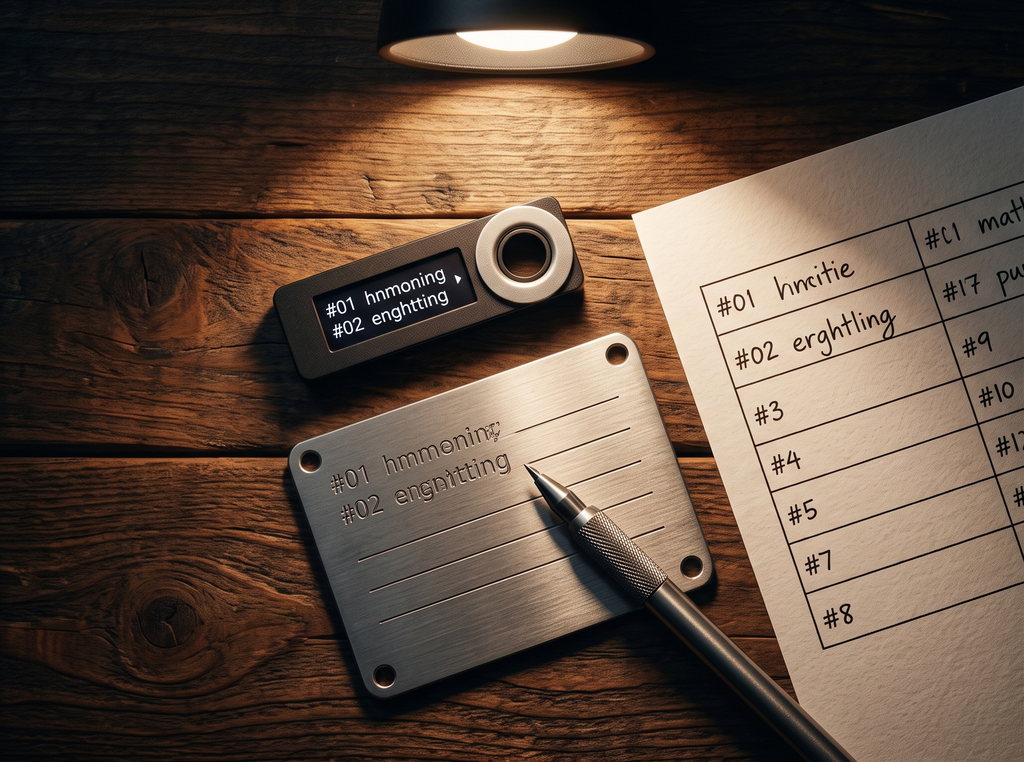
The initialization phase is the most critical operational window in the lifecycle of a hardware wallet. This is the moment your master private key is generated. If this process is flawed, or if the resulting backup is exposed even briefly to an online environment, the entire security model of the hardware wallet collapses, rendering all subsequent physical protections useless.
A rigorous hardware wallet security checklist requires generating true physical entropy, establishing robust offline backups, and employing advanced cryptographic features like passphrases to defend against physical theft and coercion.
True Random Number Generation (TRNG) and BIP-39
Private keys are essentially incredibly large, random numbers. The security of these keys relies entirely on the unpredictability of their generation. High-quality hardware wallets utilize internal True Random Number Generators (TRNGs) that leverage physical entropy sources, such as thermal noise or quantum fluctuations within the silicon, to generate a 256-bit random number. This mathematical entropy is then converted into a human-readable format using the BIP-39 standard.
The BIP-39 standard maps the 256-bit number (plus an 8-bit checksum) to a specific sequence of 24 words chosen from a standardized list of 2,048 words. It is vital that the device itself generates these words on its physical screen. You must never use a seed phrase generated by a software application, a website, or a pre-printed card. The generation must occur entirely within the air-gapped boundary of the hardware wallet’s hardware.
The Offline Backup Protocol
Once the 24-word recovery phrase is displayed on the device screen, it must be recorded immediately. The media and environment used to record this phrase dictate your long-term vulnerability to physical disasters and operational leaks.
First, ensure complete environmental privacy. Perform this step in a private room with no windows, and verify that no cameras (including smartphones, laptops, smart home devices, or security systems) have a line of sight to the device screen or your backup medium. Write the words down using physical pen and paper, or engrave them directly onto a metal backup device. Never take a photo of the recovery phrase, never type it into a computer, and never store it in a password manager or cloud backup. If the seed phrase exists on a digital medium for even a fraction of a second, it must be considered permanently compromised.
BIP-39 Passphrases (The “25th Word”)
For advanced security, users should implement a BIP-39 passphrase, often referred to as the “25th word.” This feature allows you to append an arbitrary string of characters to your 24-word recovery phrase. The hardware wallet uses the PBKDF2 function with HMAC-SHA512 to hash the combination of the 24 words and your passphrase, deriving an entirely different master private key and set of addresses.
The mathematical implication of a passphrase is profound. If an attacker gains physical possession of your 24-word backup, they still cannot access your funds without the passphrase. Crucially, there is no such thing as an “incorrect” passphrase; any string of characters you enter will generate a valid, functioning wallet. This enables “plausible deniability” configurations: you can set up a secondary, decoy wallet with a small balance using a simple passphrase to satisfy attackers in a physical coercion scenario, while keeping your primary assets secured under a complex, unrevealed passphrase.
In Short
- Ensure the recovery phrase is generated strictly on the isolated screen of the hardware wallet, utilizing its internal physical entropy source.
- Store your backup entirely offline on physical paper or robust metal plates; digital exposure of any kind invalidates the security of cold storage.
- Utilize a BIP-39 passphrase to protect against physical backup theft and enable plausible deniability in high-risk scenarios.
Phase 3: Device Configuration and Firmware Verification
Once the cryptographic identity of the wallet is initialized, the physical and software interfaces of the hardware wallet must be configured to prevent unauthorized access and ensure that the device remains resilient against active physical attacks.
This phase of the hardware wallet security checklist focuses on establishing strong access controls directly on the hardware and maintaining the cryptographic integrity of the operating environment through verified software updates.
Pin Complexity and Auto-Wipe Mechanisms
The personal identification number (PIN) is the primary physical access barrier for your hardware wallet. If an unauthorized individual gains physical access to the device, a weak PIN is the only obstacle preventing them from signing unauthorized transactions. Avoid sequential patterns (e.g., 1-2-3-4), repeating digits, or numbers associated with your identity, such as birthdays or phone numbers.
Most secure hardware wallets enforce a minimum PIN length of 4 to 8 digits and incorporate hardware-level rate limiting. For instance, the device may implement an exponential delay between incorrect PIN attempts or execute a complete factory reset (wiping all cryptographic keys from the Secure Element) after a predetermined number of consecutive failed attempts (typically 3 to 10). Ensure that your device has this auto-wipe mechanism active, and understand that as long as your backup phrase is safely secured elsewhere, a device wipe is a benign security event rather than a loss of funds.
Firmware Integrity and GPG Verification
Firmware is the low-level software that governs the operations of your hardware wallet. Operating with outdated or unverified firmware exposes the device to known cryptographic vulnerabilities or logical bugs. However, updating firmware also introduces risk if the update process is intercepted by a malicious actor.
Always perform firmware updates exclusively through the manufacturer’s official companion software. Before downloading any companion software updates, verify the GPG (GNU Privacy Guard) signatures of the executable files against the manufacturer’s official release keys. This ensures that the software has not been altered by a compromised server or a DNS hijacking attack. Once the firmware file is sent to the device, the hardware wallet’s bootloader will cryptographically verify the signature of the firmware before installing it. If the signature is invalid, the device will refuse to boot, protecting you from malicious code execution.
Quick Summary
- Set a complex, non-sequential PIN of at least 6 to 8 digits to prevent physical access bypass.
- Ensure the device’s auto-wipe threshold is enabled, allowing it to destroy local cryptographic keys after repeated failed PIN entries.
- Verify the GPG signatures of companion desktop software before execution, and update firmware only through verified, official channels.
Phase 4: Ongoing Transaction and Hygiene Protocols
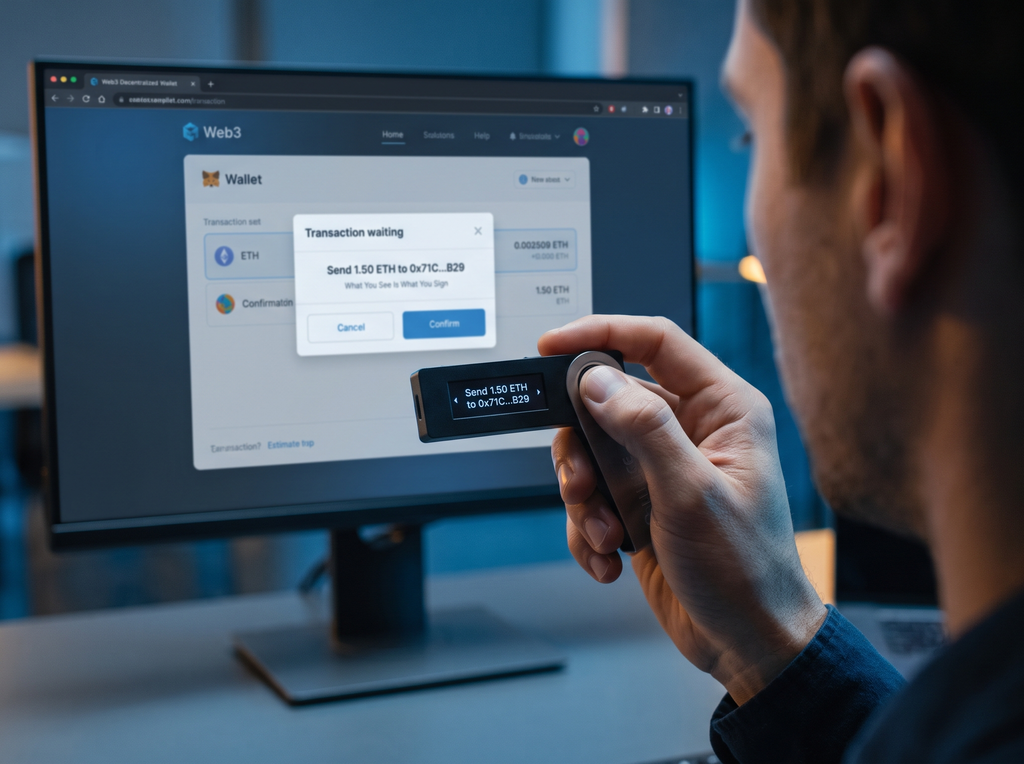
A perfectly initialized and configured hardware wallet can still be bypassed if the user fails to execute correct transactional hygiene. When interacting with decentralized networks, the hardware wallet acts as an execution environment, but the instructions it executes are provided by the host computer. If the host computer is compromised, an attacker will attempt to manipulate the transaction details before they reach the hardware wallet.
Maintaining a rigorous transaction protocol is the final, ongoing phase of our hardware wallet security checklist. It requires a strict adherence to the “What You See Is What You Sign” (WYSIWYS) principle and a deep understanding of smart contract interaction risks.
Clear Signing vs. Blind Signing
When executing simple transactions, such as sending native assets from one address to another, the hardware wallet can easily parse the transaction data and display the exact destination address and asset amount on its physical screen. This is known as clear signing. You must always verify that the address displayed on the hardware wallet’s screen matches your intended destination character-for-character.
In contrast, interacting with complex smart contracts (such as decentralized exchanges or governance protocols) often requires blind signing. Because the hardware wallet cannot always parse complex smart contract payloads, it displays a raw cryptographic hash of the transaction data instead of human-readable instructions. Blind signing is exceptionally dangerous; if your host computer is compromised, malware can modify the smart contract payload to grant an attacker full transfer authorization over your tokens, and you will unknowingly approve this on your hardware wallet. Where possible, avoid blind signing entirely, or utilize advanced hardware wallets that support clear signing for specific smart contract ecosystems.
Address Verification and Clipboard Hijacking
A common malware family known as a clipboard hijacker monitors the operating system’s clipboard for alphanumeric strings that resemble cryptocurrency addresses. When a user copies a destination address, the malware instantly replaces it with an address controlled by the attacker. If the user pastes the address and executes the transaction without verification, the funds are sent to the attacker.
To neutralize this threat, never rely on the address displayed on your computer screen or pasted into a browser. The physical screen of your hardware wallet is the only trusted display in your security architecture. Always compare the destination address character-by-character on the physical screen of the hardware wallet against an independent source, such as a paper invoice or a verified communications channel. Pay specific attention to the first 10 and last 10 characters, as attackers frequently generate lookalike addresses (address collision) to deceive users who only perform partial checks.
Advanced Orchestration: Multi-Signature Frameworks
For individuals managing substantial digital asset treasuries, relying on a single hardware wallet introduces a physical single point of failure. If the single device is lost, stolen, or compromised via an unpatched physical exploit, the assets are at risk. To achieve institutional-grade security, transition from a single-signature configuration to a multi-signature (multisig) framework.
A multisig setup (such as a 2-of-3 or 3-of-5 configuration) requires transactions to be signed by multiple, independent hardware wallets before they are broadcast to the network. By utilizing devices from different manufacturers (e.g., combining a Ledger, a Trezor, and a Coldcard), you eliminate the systemic risk of a supply chain compromise or a hardware-specific exploit affecting a single manufacturer. Furthermore, the physical backups of these devices must be geographically segregated, ensuring that a localized disaster (such as a fire or break-in) cannot compromise the threshold of keys required to access the funds.
Key Takeaways
- Treat the physical screen of your hardware wallet as the sole source of truth; never trust addresses displayed on your computer or phone screen.
- Avoid blind signing smart contract transactions whenever possible, as this bypasses the visual verification advantages of a hardware wallet.
- Implement a multi-signature framework using devices from different manufacturers to eliminate single-vendor vulnerabilities and physical points of failure.
Failure Modes: Case Studies of Hardware Wallet Compromise
To understand the practical necessity of the hardware wallet security checklist, we must analyze real-world failure modes where users lost assets despite owning a hardware wallet. These case studies highlight that security is a continuous operational discipline rather than a one-time purchase.
The Pre-Seeded Amazon Retail Scam
A prominent failure mode involved users purchasing hardware wallets from unverified third-party sellers on Amazon. The attackers opened the packaging, initialized the device to generate a specific 24-word recovery phrase, and printed this recovery phrase on a fake “scratch-off” card included in the box. They then repackaged the device to look brand new.
When the buyers received the devices, they followed the fake instructions, scratched off the card, and imported the pre-generated recovery phrase into the wallet instead of generating a new one on the device screen. The buyers then deposited significant assets onto the addresses. Because the attackers held the private keys corresponding to that pre-generated recovery phrase, they immediately drained the wallets once funds were deposited. This exploit succeeded entirely by bypassing the initialization protocol of the hardware wallet security checklist.
The Clipboard Hijacker and Address Collision Attack
In another documented case, a user attempted to transfer a large volume of stablecoins to a centralized exchange. The user copied the deposit address from the exchange’s website. However, active malware on the user’s computer intercepted the clipboard and replaced the copied address with an attacker-controlled address that shared the same first five and last five characters.
The user pasted the address into their companion application. Because the first and last characters matched, the user quickly glanced at the hardware wallet screen and clicked “approve.” The stablecoins were sent directly to the attacker’s contract and immediately laundered through decentralized mixers. This loss occurred because the user failed to conduct a complete, character-by-character verification of the address on the physical screen of the device.
Physical Extraction via Voltage Glitching
Historically, security researchers (such as those at Kraken Security Labs) demonstrated physical extraction exploits on early-generation hardware wallets that lacked a dedicated Secure Element. By physical disassembly of the device and applying precise voltage fluctuations (glitching) to the general-purpose microcontroller during boot-up, researchers bypassed the chip’s read protection mechanisms. This allowed them to read the flash memory directly and extract the encrypted seed phrase, which they then decrypted using brute-force attacks on weak user PINs.
This attack vector demonstrated that physical custody of a device lacking a Secure Element can lead to compromise. It underscored the critical need for two defenses: first, using modern devices equipped with certified Secure Elements, and second, utilizing a strong BIP-39 passphrase that is never stored on the physical device itself.
Bottom Line
- Historical exploits prove that physical custody of a device can lead to compromise if the device lacks a hardened Secure Element and a strong BIP-39 passphrase.
- Pre-seeded retail scams succeed by exploiting a user’s lack of familiarity with correct initialization protocols, highlighting the need for rigorous education.
- Address collision attacks rely on human laziness; verifying only the beginning and end of a cryptographic address is an invitation to catastrophic loss.
Final Checklist: Your Operational Security Protocol
This operational checklist must be executed methodically for every hardware wallet in your custody. Do not skip any steps, and treat every warning as a potential compromise vector.
1. Procurement Verification
- Verify the device was shipped directly from the official manufacturer or an authorized distributor.
- Confirm the outer packaging shows no signs of physical tampering, resealing, or anomalous inserts.
- Connect the device to the official companion app and complete the cryptographic attestation handshake.
2. Initialization Protocol
- Ensure the 24-word recovery phrase is generated entirely on the physical screen of the device, using its internal TRNG.
- Record the recovery phrase using physical ink on paper or engrave it onto a fireproof metal plate.
- Conduct this process in an isolated environment, ensuring no digital cameras, smart devices, or windows have visibility.
- Configure a complex BIP-39 passphrase (the “25th word”) to encrypt your seed backup, and store this passphrase physically separate from the 24 words.
3. Device Hardening
- Configure a highly secure, non-sequential PIN of 6 to 8 digits.
- Verify the device’s auto-wipe threshold is active (wiping internal storage after consecutive incorrect PIN attempts).
- Verify the GPG signatures of the companion desktop application before installing any updates.
- Perform firmware updates only when prompted directly within the verified companion application.
4. Transaction Hygiene
- Always verify the complete destination address character-by-character on the physical screen of the hardware wallet before signing.
- Never approve a transaction via blind signing unless absolutely necessary, and only do so after verifying the smart contract interactions through independent tools.
- Conduct periodic physical audits of your backup locations to ensure they remain dry, secure, and untampered with.
Frequently Asked Questions
What is the difference between a secure element and a general-purpose microcontroller in hardware wallets?
A general-purpose microcontroller (MCU) is a standard chip designed for generic processing tasks. It is vulnerable to physical attacks, such as voltage glitching and side-channel analysis, which can allow an attacker with physical access to extract the private keys. A Secure Element (SE) is a hardened, tamper-resistant chip specifically designed to run cryptographic applications. It features physical shielding, environmental sensors, and constant-time execution paths to actively defend against physical key extraction and side-channel monitoring.
Why is a BIP-39 passphrase (25th word) necessary if I already have a 24-word seed phrase?
A BIP-39 passphrase adds a critical layer of security by acting as an encryption salt for your 24-word seed phrase. If an attacker physically steals your 24-word backup plate, they cannot access your funds without the passphrase. Crucially, because any passphrase generates a unique, valid cryptographic wallet, it enables plausible deniability. You can set up a decoy wallet with a minor balance on a simple passphrase to satisfy coercion threats, while keeping your primary assets safe under a hidden passphrase.
Can a hardware wallet be compromised by a supply chain attack, and how do I detect it?
Yes, a hardware wallet can be compromised during shipment if an attacker intercepts the package to flash malicious firmware or pre-configure a recovery phrase. To detect this, you must buy directly from verified manufacturers, physically inspect the packaging for anomalies, and complete the cryptographic attestation check inside the official companion app. The attestation check uses cryptographic handshakes to verify the unique digital signature embedded in the Secure Element during manufacturing.
What is blind signing, and why does it represent a significant security risk?
Blind signing occurs when a hardware wallet cannot parse the complex payload of a smart contract transaction, displaying only a raw cryptographic hash on its screen instead of human-readable details. This is highly risky because if your host computer is compromised with malware, the attacker can alter the smart contract transaction to drain your tokens, and you will unknowingly authorize it because the hardware wallet screen cannot show the true intent of the contract.
How does a multi-signature configuration enhance hardware wallet security?
A multi-signature (multisig) configuration distributes control of your assets across multiple independent hardware wallets (e.g., a 2-of-3 setup). To move funds, transactions must be signed by a threshold of different devices. This eliminates single points of failure, including supply chain compromises of a single manufacturer, physical theft of a single wallet, or localized disasters, provided the hardware devices and backups are physically and geographically segregated.